Algo Trading in MT5: What Traders Need to Know
TL;DR:
- Algorithmic trading in MT5 uses Expert Advisors to automate trade execution based on predefined rules. It relies on an event-driven architecture that organizes logic into dedicated handlers, improving reliability and ease of debugging. Proper backtesting and ongoing monitoring are essential to mitigate risks and ensure successful deployment.
Algorithmic trading in MetaTrader 5 is the automated execution of trades through Expert Advisors (EAs), compiled MQL5 programs that open, modify, and close positions without manual input. What is algo trading in MT5, at its core? It is a system where predefined rules replace discretionary decisions. The EA accesses price data, applies your strategy logic, and sends trade orders directly to your broker on every market tick. MT5’s built-in Strategy Tester, MQL5 programming language, and event-driven architecture make it one of the most complete platforms for developing and deploying automated strategies.
What is algo trading in MT5 and how do Expert Advisors work?
An Expert Advisor is a compiled MQL5 script that runs inside the MT5 terminal. It is not a background service or a cloud process. The EA lives inside your open MT5 session and responds to market events as they arrive.
MT5 uses an event-driven framework to organize EA logic. Each event type has a dedicated handler function:
- OnInit: Runs once when the EA loads. Use it to validate inputs and initialize variables.
- OnTick: Fires on every price update. This is where your core trade logic lives.
- OnTimer: Executes on a fixed time interval. Useful for periodic checks independent of price movement.
- OnChartEvent: Responds to user interactions like button clicks on the chart.
- OnDeinit: Runs when the EA is removed or the terminal closes. Use it for cleanup.
This separation matters. Distributing EA logic across event handlers prevents one function from blocking another, which reduces the risk of missed ticks or frozen execution during fast markets. When something breaks in live trading, isolated handlers make the source of the problem far easier to find.
The EA receives market data through built-in MQL5 functions, applies your rule set (for example, a moving average crossover or RSI threshold), and calls trade functions to place, modify, or close orders. The entire lifecycle of a trade, from entry signal to exit, runs without you touching the keyboard.

Pro Tip: Organize your EA code strictly by event type from the start. Mixing tick logic with timer logic inside a single function creates debugging nightmares that compound as the strategy grows.
How to use the MT5 Strategy Tester to validate your EA
The Strategy Tester is MT5’s built-in backtesting and optimization engine. Serious traders treat it as a mandatory step before any live deployment.
Setting up a backtest follows a clear sequence:
- Open the Strategy Tester from the View menu or press Ctrl+R.
- Select your EA from the Expert Advisor dropdown.
- Choose the trading symbol and timeframe.
- Set the modeling mode. “Every Tick” provides the highest fidelity by simulating each price movement.
- Define the testing period, starting deposit, and leverage.
- Enable optimization if you want to test a range of parameter values.
- Click Start and review the results in the Report, Graph, and Optimization tabs.
The tester produces metrics beyond simple profit and loss. Sharpe Ratio measures return relative to risk. Maximum drawdown shows the largest peak-to-trough loss during the test period. These numbers tell you whether a strategy is worth running, not just whether it made money on paper.
MT5 supports genetic optimization for parameter tuning. Instead of testing every possible combination, the genetic algorithm selects the most promising parameter sets and iterates toward better results. This saves significant computation time on complex strategies.
| Metric | What it measures | Why it matters |
|---|---|---|
| Sharpe Ratio | Return per unit of risk | Higher values indicate more consistent performance |
| Max drawdown | Largest equity decline | Shows worst-case loss exposure |
| Profit factor | Gross profit divided by gross loss | Values above 1.5 suggest a viable edge |
| Recovery factor | Net profit divided by max drawdown | Measures how efficiently the strategy recovers losses |
The most common mistake in backtesting is curve-fitting. This happens when you tune parameters so tightly to historical data that the EA fails on any new data. The fix is out-of-sample testing: reserve a portion of your historical data, optimize on the earlier segment, then run the EA on the reserved segment without changing parameters. If performance collapses on the reserved data, the strategy is overfit.
Pro Tip: Use high-quality tick data from MT5’s History Center when running “Every Tick” backtests. Low-quality data produces misleading results that do not reflect live behavior.
What are the core benefits of algorithmic trading on MT5?
Algorithmic trading removes the two biggest sources of trading failure: emotional decisions and inconsistent execution. The benefits are structural, not situational.
- Speed: An EA executes a trade order in milliseconds after a signal triggers. A human trader reading the same chart takes seconds at minimum, often longer.
- Emotional discipline: The EA does not hesitate, second-guess, or revenge-trade after a loss. It follows the rules exactly as coded, every time.
- Repeatability: The same strategy runs across multiple symbols and timeframes simultaneously without fatigue or attention drift.
- Hypothesis-driven development: Backtesting lets you test a strategy idea on years of data before risking capital. Manual traders have no equivalent tool.
- Automated risk controls: Stop loss, take profit, and trailing stop orders execute automatically. The EA enforces risk management rules without relying on your discipline in the moment.
The comparison to manual trading is straightforward. A manual trader applying the same rules on 10 currency pairs across two sessions will make execution errors. An EA running the same rules makes none. The quality of the outcome depends entirely on the quality of the strategy, not on the trader’s attention span.
What risks come with MT5 algorithmic trading?
Automated execution does not eliminate risk. It shifts the source of risk from human judgment to system design and market conditions.
The FCA’s review of algorithmic trading controls identified several recurring failure points across firms:
- Coding errors that produce unintended trade behavior
- Inadequate testing under stressed or illiquid market conditions
- Missing documentation that prevents post-incident analysis
- Insufficient kill switches or position limits to stop a malfunctioning EA
“Firms must implement adequate controls, robust testing, and compliance oversight. Algorithms must be tested under stressed conditions before deployment and monitored continuously after launch.” — FCA, Multi-Firm Review of Algorithmic Trading Controls
Backtesting limitations are a separate category of risk. A strategy that performs well on historical data can underperform in live markets due to slippage, spread widening, or structural market changes. Forward testing on a demo account bridges this gap before real capital is at risk.
Internal controls matter as much as external compliance. Setting a maximum drawdown limit that automatically disables the EA protects your account when a strategy enters a losing streak. Running multiple uncorrelated strategies reduces the impact of any single EA failing. The 1-2% risk rule per trade is a widely used position sizing discipline that applies directly to EA configuration.
How to get started with algorithmic trading in MT5
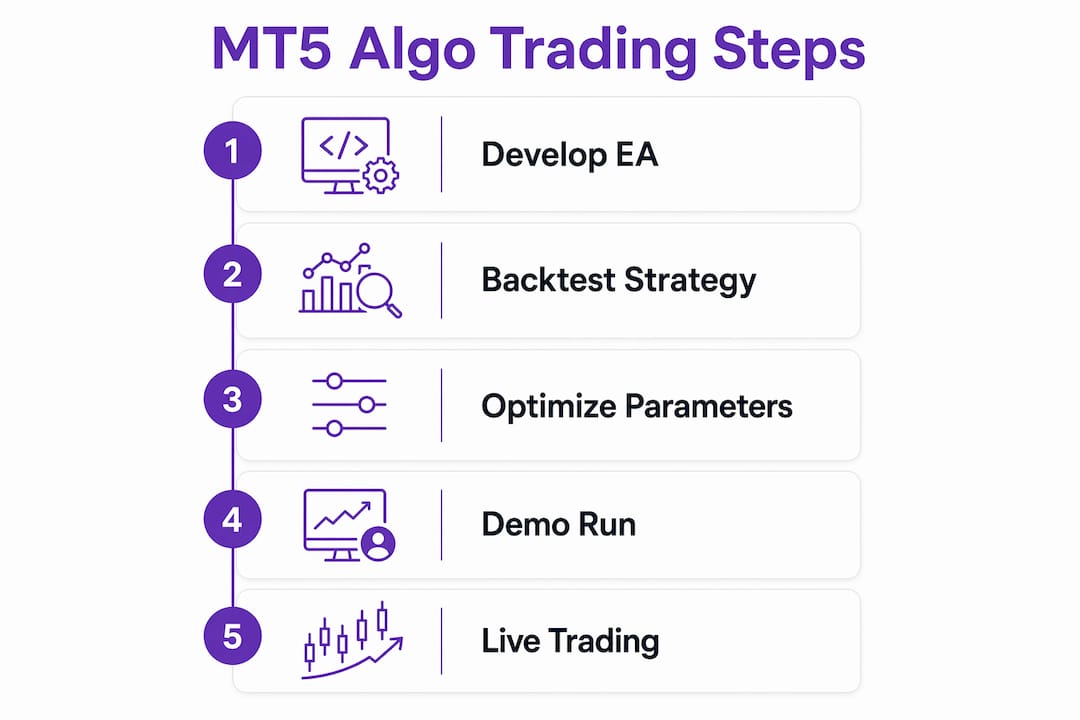
Getting an EA running in MT5 does not require programming knowledge. The process from installation to live trading follows a defined path.
- Download and install MT5 from your broker’s website or MetaQuotes directly. Open a demo account to practice without risking capital.
- Obtain an EA file (.ex5 format). Pre-built EAs are available on the MQL5 Marketplace. No coding is required to attach and run a pre-built EA.
- Copy the .ex5 file into the MT5 Experts folder. Refresh the Navigator panel to see it listed.
- Drag the EA onto a chart or double-click it in the Navigator. A settings dialog opens where you configure parameters like lot size, stop loss distance, and indicator periods.
- In the EA settings dialog, check “Allow algorithmic trading.” Also confirm the Algo Trading button in the MT5 toolbar is active (it turns green when enabled).
- Run the EA in the Strategy Tester on your chosen symbol and period before switching to live trading.
- Once satisfied with backtest results, attach the EA to a live chart and monitor its first sessions closely.
Traders who want custom strategies beyond pre-built EAs can write MQL5 code directly in MetaEditor, MT5’s built-in IDE. MT5 also supports a Python API for traders who prefer Python-based strategy development connected to the terminal.
Pro Tip: Run your EA on a demo account for at least two to four weeks of live market conditions before deploying real capital. Backtests show historical fit. Demo trading shows real execution behavior.
Key Takeaways
Algorithmic trading in MT5 works because Expert Advisors enforce predefined rules with speed and consistency that manual trading cannot match, provided the strategy is rigorously tested and monitored.
| Point | Details |
|---|---|
| EAs automate the full trade lifecycle | Expert Advisors open, modify, and close trades based on coded rules without manual input. |
| Event-driven design improves reliability | Separating logic into OnTick, OnTimer, and OnInit handlers reduces errors and simplifies debugging. |
| Strategy Tester is non-negotiable | Use “Every Tick” mode and out-of-sample validation before any live deployment. |
| Automation does not eliminate risk | Coding errors, curve-fitting, and market stress can all cause EA failure without proper controls. |
| Beginners can start without coding | Pre-built .ex5 EAs attach directly to charts; programming is only needed for custom strategies. |
Why disciplined testing separates successful algo traders from the rest
The traders I see struggle most with MT5 automation are not the ones who can’t code. They are the ones who skip the testing discipline. They run a backtest, see a promising equity curve, and go live the next day. Three weeks later, the EA is losing money in ways the backtest never showed.
The event-driven architecture of MQL5 is genuinely well-designed. When you separate your logic cleanly across handlers, debugging a live issue takes minutes instead of hours. I have seen traders with messy, monolithic OnTick functions spend days tracing a bug that a properly structured EA would have surfaced immediately. Structure is not a style preference. It is a reliability requirement.
The Strategy Tester is not a profit predictor. It is a falsification tool. You use it to find out why a strategy should not work, not to confirm that it will. The traders who treat it as a confirmation machine end up with overfit strategies that collapse on the first regime change. The ones who use it to stress-test and break their own ideas end up with strategies that hold up.
Continuous monitoring after deployment is where most beginners underinvest. Markets change. A strategy optimized for trending conditions will underperform in a ranging market. Checking your EA’s live metrics weekly, comparing them to backtest benchmarks, and knowing when to pause it are skills that matter as much as the initial build. Automation handles execution. Judgment handles oversight. You still need both.
You can apply the same disciplined framework to AI-driven trading strategies across other asset classes, including crypto, where market conditions shift even faster than in forex.
— Grisha
Darkbot and systematic crypto trading automation
Traders who build disciplined algo strategies in MT5 often look for the same systematic execution in crypto markets. Darkbot applies rule-driven automation and probabilistic pattern evaluation to cryptocurrency trading across multiple exchanges, without relying on prediction or market timing.
The platform connects to exchanges via API keys, runs multiple bots simultaneously, and enforces structured risk controls at the position level. Its automated crypto trading approach mirrors the MT5 philosophy: consistent execution, defined rules, and repeatable logic. Darkbot also offers portfolio management tools for traders who want automated rebalancing alongside strategy execution. For traders already thinking in systems, the transition from MT5 algo logic to crypto automation is a natural next step.
FAQ
What is an Expert Advisor in MT5?
An Expert Advisor is a compiled MQL5 program that automatically executes trades in MetaTrader 5 based on predefined rules. It runs on every price tick while the MT5 terminal is open, handling the full trade lifecycle without manual input.
Do I need to know how to code to use algo trading in MT5?
No. Pre-built Expert Advisors in .ex5 format can be attached to any chart and configured through a settings dialog without writing a single line of code. MQL5 programming is only required if you want to build a custom strategy from scratch.
What is the MT5 Strategy Tester used for?
The Strategy Tester backtests Expert Advisors on historical data using modeling modes like “Every Tick” to simulate real market conditions. Traders use it to validate strategy logic, measure risk metrics like drawdown and Sharpe Ratio, and optimize parameters before live deployment.
What are the main risks of algorithmic trading in MT5?
The primary risks include coding errors that cause unintended trades, curve-fitting that makes backtests misleading, and EA underperformance during unusual market conditions. The FCA recommends robust testing under stressed conditions and continuous monitoring after deployment.
How do I activate algo trading in MT5?
Enable “Allow algorithmic trading” in the EA settings dialog when attaching it to a chart, then confirm the Algo Trading button in the MT5 toolbar is active. When the button is green, the EA can place trades on your behalf.
Recommended

Start trading on Darkbot with ease
Come and explore our crypto trading platform by connecting your free account!
Free plan available • No credit card required