Binance API Key Permissions for Secure Bot Trading
For a live trading bot, the minimum viable Binance API key permissions are Enable Reading (USER_DATA) and Enable Spot & Margin Trading (TRADE). Never enable Enable Withdrawals on any key used for automation. Pair those two permissions with an IP whitelist, and you have a configuration that lets a bot execute orders while keeping funds safe from extraction.
Here is the quick mapping by use case:
| Use Case | Required Permissions | Notes |
|---|---|---|
| Read-only monitoring | Enable Reading (USER_DATA) | No trading access; lowest risk |
| Paper trading / backtesting | Enable Reading (USER_DATA) | No live order placement needed |
| Execution bot (spot) | Enable Reading + Enable Spot & Margin Trading | IP whitelist required |
| Portfolio manager (multi-asset) | Enable Reading + Enable Spot & Margin Trading | Separate key from monitoring key |
| Futures bot | Enable Reading + Enable Futures | Futures must be activated on account first |
Two controls are non-negotiable regardless of use case: restrict the key to specific IPv4 addresses (or use a self-generated asymmetric key), and confirm your account has 2FA active before creating any key. Both are prerequisites, not optional hardening steps.
Key Takeaways
For automated trading on Binance, the minimum safe configuration is Enable Reading plus Enable Spot & Margin Trading, with Withdraw disabled and an IPv4 whitelist applied to every key.
| Point | Details |
|---|---|
| Minimum permissions for a live bot | Enable Reading (USER_DATA) and Enable Spot & Margin Trading (TRADE) only. |
| Withdraw must stay disabled | No bot function requires it; enabling it without IP restrictions is a critical security gap. |
| IP restriction is the primary defense | A leaked key with no IP whitelist is immediately exploitable; use static IPs or self-generated keys. |
| Separate keys by function | One key for trading, one for monitoring; limits blast radius if a key is compromised. |
| Darkbot uses least-privilege keys | Darkbot’s onboarding configures execution keys with minimal permissions and validates setup in paper trading mode first. |
What do Binance API key permissions actually control?
Binance API key permissions are organized into security types that determine which endpoints a key can reach and what operations it can perform. Each endpoint in the Binance REST API carries an annotated security type, and a request will fail if the key does not hold the matching permission.
The four core categories are:
- NONE — public market data (order book, ticker, exchange info). No API key required at all.
- USER_DATA — private account endpoints: balance, open orders, trade history, account status. Requires a signed request.
- TRADE — order placement and cancellation. Also requires a signed request and must be explicitly enabled on the key.
- USER_STREAM — creates and manages a listen key for the WebSocket user data stream. Lower sensitivity than TRADE, but still account-scoped.
Newly created keys do not have TRADE enabled by default. You must go into API Management and turn it on after creation.
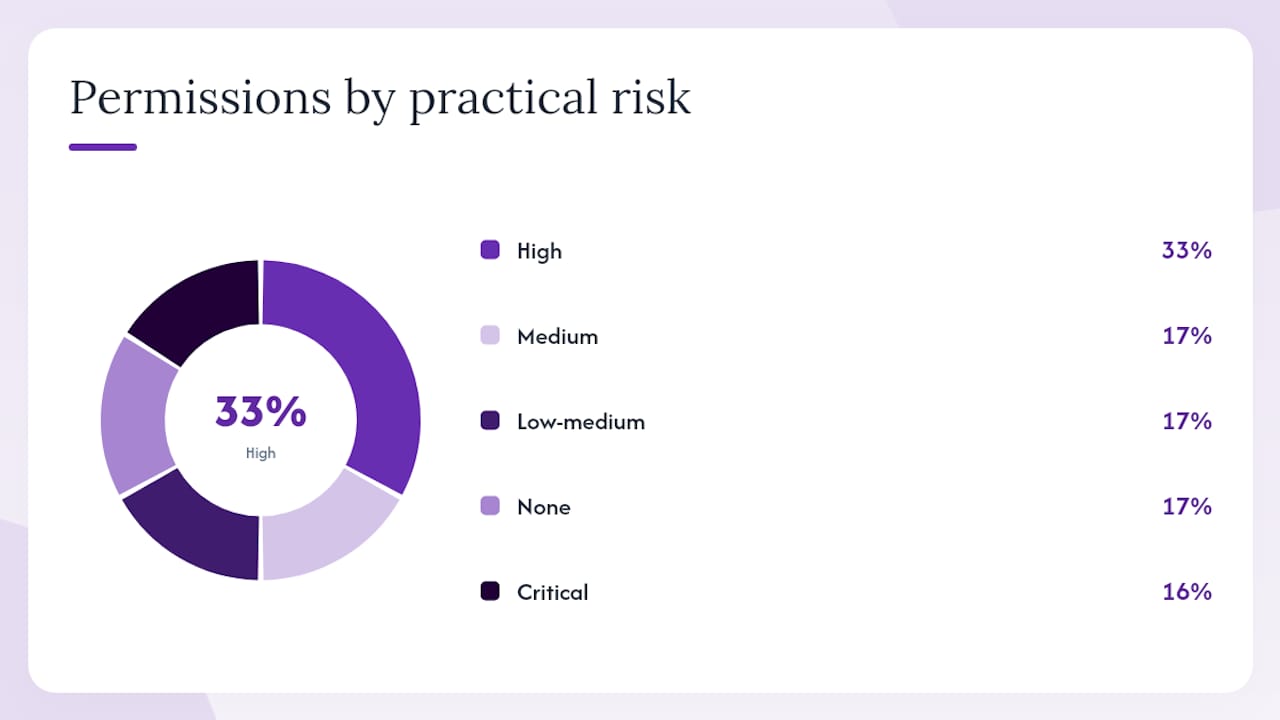
| Permission | Example Endpoints / Actions | Practical Risk |
|---|---|---|
| NONE | GET /api/v3/exchangeInfo, GET /api/v3/ticker/price | None — public data |
| USER_DATA | GET /api/v3/account, GET /api/v3/myTrades | Medium — exposes balances and history |
| TRADE | POST /api/v3/order, DELETE /api/v3/order | High — can move funds between assets |
| USER_STREAM | POST /api/v3/userDataStream | Low-medium — stream access only |
| Enable Withdrawals | POST /sapi/v1/capital/withdraw/apply | Critical — irreversible fund movement |
| Enable Futures | Futures order placement, position queries | High — leveraged positions |
The Withdraw permission is in a category of its own. Binance requires enforced IPv4 IP restrictions before it will even save a key with Withdraw enabled. That friction is intentional: a leaked key with Withdraw access and no IP restriction is an open door to fund extraction. For any automated trading setup, leave Withdraw disabled entirely. If you genuinely need programmatic withdrawals, isolate that function on a dedicated key with a locked-down IP list and treat it as a separate operational risk.
Futures and Margin permissions are additive flags on top of the base categories. A key with TRADE enabled does not automatically reach futures endpoints — the account must have Futures activated, and the key must have the Futures flag set. The exchangeInfo endpoint returns permissions and permissionSets fields that describe which account permissions enable trading for a given symbol, which is useful for symbol-level permission checks before placing orders programmatically.
How do you create and configure a Binance API key?
Prerequisites
Before the API Management section even becomes available, three conditions must be met, per the official Binance support FAQ:
- Two-factor authentication (2FA) must be active on the account.
- Identity verification (KYC) must be complete.
- At least one deposit must have been made to the Spot Wallet (any amount).
If any of these are missing, the API creation UI will be gated or unavailable.
Step-by-step key creation
- Log into Binance and navigate to Profile > API Management.
- Click Create API. Choose between System-generated (HMAC-SHA256 key pair) or Self-generated (Ed25519 or RSA asymmetric key pair). Self-generated keys are required if you want to enable Withdraw or need higher-privilege access without IP restrictions.
- Name the key descriptively (e.g.,
darkbot-spot-trading-prod). Avoid generic names likebot1— you will thank yourself during an incident. - Complete the 2FA challenge.
- Copy the API Key and Secret Key immediately. The secret is shown only once.
- In the key settings, enable only the permissions your bot needs. For a spot trading bot: Enable Reading and Enable Spot & Margin Trading. Leave everything else off.
- Under IP Access Restrictions, select Restrict access to trusted IPs only and add your server’s IPv4 address.
- Save and confirm with 2FA again.
Why options are greyed out
Greyed-out permissions are almost always caused by one of these conditions:
- Futures permission greyed out: The account does not have Futures activated. Activate it first at the account level, then create a new key. Keys created before Futures activation often cannot have the Futures flag added retroactively — the reliable fix is to create a fresh key after activation.
- Withdraw greyed out or unsaveable: No IPv4 IP restriction has been added. Binance will not save a Withdraw-enabled key without a specific IP address on the whitelist.
- All permissions limited to reading: The key is system-generated and the IP access is set to unrestricted. System-generated keys default to read-only when no IP restriction is applied.
Pro Tip: Use Ipify to get your server’s current public IPv4 address. If your bot runs on a cloud instance with a static IP, add that single address. If you use multiple egress IPs or a NAT gateway, add each one individually — Binance accepts CIDR notation for ranges (e.g., 203.0.113.0/24), which is useful when your provider allocates a block rather than a single address.
Security checklist for API keys used in automated trading
The core principle across all API platforms is least privilege: grant only what the function requires, nothing more. Binance Academy states this explicitly and recommends separating keys by role. The same RBAC pattern used in enterprise API platforms — scoped keys with constrained permissions — applies directly here, as documented in other major API platforms.
Checklist:
- Create a dedicated key per function: one for trading execution, a separate one for monitoring or read-only analytics. If one key is compromised, the blast radius stays contained.
- Disable Enable Withdrawals on every bot key, without exception.
- Enable IP restrictions on every key. For API key security in automated crypto trading, IP whitelisting is the primary defense when a key leaks — a leaked key with no IP restriction is immediately usable by anyone.
- Store secrets in a managed secrets store (HashiCorp Vault, AWS Secrets Manager, GCP Secret Manager) rather than in plain
.envfiles or config files committed to version control. - Audit key usage weekly. Binance shows last-used timestamps in API Management — any key that hasn’t been used in 30 days should be reviewed and likely revoked.
- Rotate keys on a fixed schedule and immediately on any suspected compromise. A practical zero-downtime key rotation approach involves creating the new key, updating the secret store, verifying the bot connects successfully, then revoking the old key.
If you suspect a key has been compromised, revoke it immediately from API Management before doing anything else. Do not wait to investigate first. Pause any running bots, open a support ticket with Binance (include the key label, approximate time of suspected compromise, and any unusual activity you observed), and reissue a new key with fresh credentials. Binance documentation is explicit: immediate revocation and contacting support are the first two steps.
Pro Tip: Set up alerts on your bot’s order volume. An anomalous spike in order count or a sequence of orders outside your strategy’s normal parameters is often the first detectable signal of a compromised key being used by a third party.
Industry data shows that 70% of exchanges support IP-based API key security as a standard control — but enabling it is still a manual step that many traders skip. Skipping it is the single most common configuration error in bot deployments.
Which endpoints require which permissions?
Signed endpoints require a valid API key and signature — any endpoint beyond public market data falls into this category. The signature is an HMAC-SHA256 hash of the query string using your secret key, combined with a timestamp parameter.
| Endpoint | HTTP Method | Required Permission | Notes |
|---|---|---|---|
| GET /api/v3/exchangeInfo | GET | NONE | Public; no key needed |
| GET /api/v3/ticker/price | GET | NONE | Public market data |
| GET /api/v3/account | GET | USER_DATA (signed) | Returns balances and account status |
| GET /api/v3/myTrades | GET | USER_DATA (signed) | Trade history |
| POST /api/v3/order | POST | TRADE (signed) | Place a new order |
| DELETE /api/v3/order | DELETE | TRADE (signed) | Cancel an order |
| POST /sapi/v1/capital/withdraw/apply | POST | Withdraw (signed) | Requires IP whitelist |
| POST /api/v3/userDataStream | POST | USER_STREAM | Creates a listen key |
A minimal signed request using curl looks like this:
curl -H "X-MBX-APIKEY: <your_api_key>" \
  "https://api.binance.com/api/v3/account?timestamp=<ms_timestamp>&signature=<hmac_sha256>"
The timestamp must be within 5,000 milliseconds of Binance’s server time. Clock drift beyond that threshold returns a -1021 error (INVALID_TIMESTAMP), which is one of the most common causes of failed signed requests. Sync your server clock with NTP and check GET /api/v3/time if you see repeated timestamp errors.
For symbol-level permission checks, query GET /api/v3/exchangeInfo and inspect the permissionSets field for the symbol you intend to trade. The Binance API swagger spec documents the structure. A bot can use this programmatically to verify that the account’s permission set matches the symbol’s requirements before attempting order placement, avoiding a class of runtime errors entirely.
Pro Tip: Some private endpoints require USER_DATA specifically, not just “Enable Reading.” The two are not identical. If a call to /api/v3/account returns a permission error despite the key appearing active, check whether USER_DATA is explicitly enabled rather than assuming reading access covers it.
How do you diagnose and fix API permission errors?
Most permission failures fall into a small number of categories. Work through this sequence before escalating:
Step 1 — Read the HTTP status and error code.
Binance returns structured JSON errors. -2014 means the API key format is invalid. -2015 means the key is invalid, IP is not whitelisted, or permissions are insufficient. -1021 is a timestamp issue. The error code tells you which branch to investigate.
Step 2 — Verify permissions in API Management. Log in, go to API Management, and confirm the key has the permissions your bot actually needs. It is common to create a key, forget to enable TRADE, and then spend time debugging what is actually a one-checkbox fix.
Step 3 — Validate the IP whitelist. Your server’s outbound IP must exactly match what is listed on the key. Cloud instances can have their IP change after a restart or redeployment. Use ipify.org from the server itself to confirm the current public IP, then compare it against the key’s whitelist.
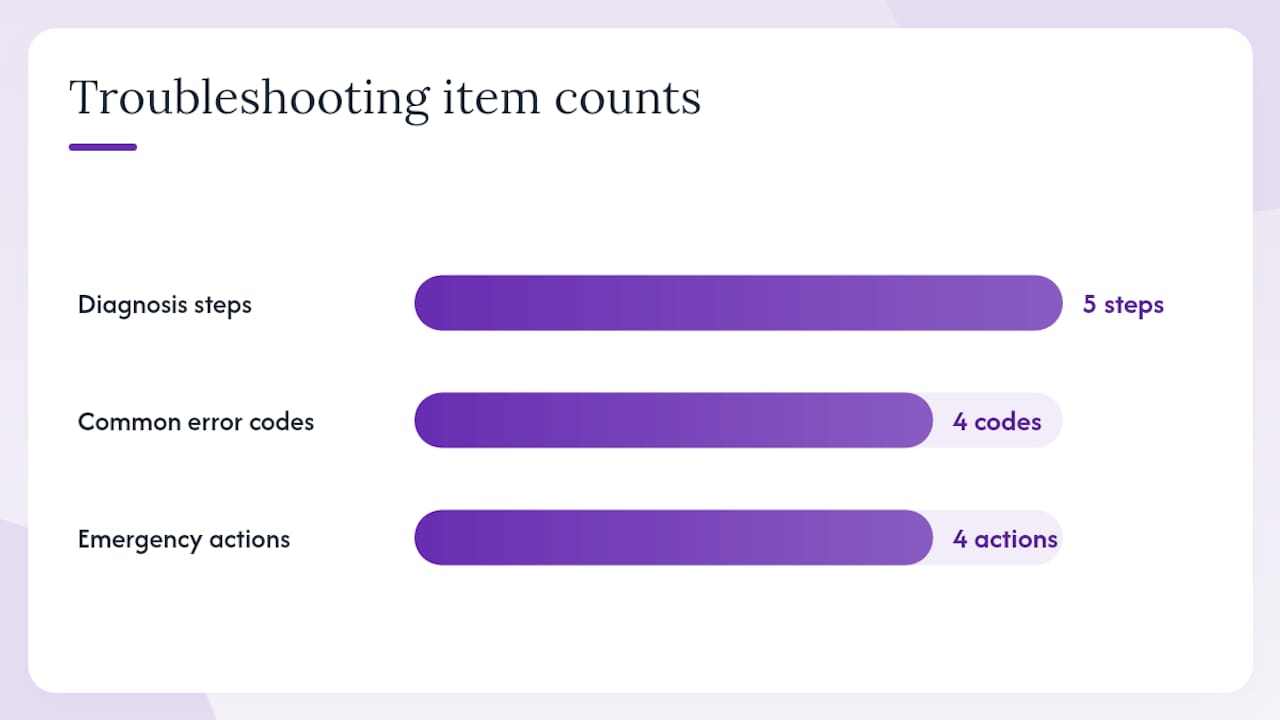
Step 4 — Check timestamp and signature.
Run GET /api/v3/time and compare the response to your local clock. A drift over 1–2 seconds is worth correcting even if it hasn’t caused errors yet. Verify your HMAC construction includes all required parameters in the correct order.
Step 5 — Check account feature activation. If Futures or Margin endpoints are failing, confirm those features are active at the account level, not just on the key. A key with Futures permission on an account without Futures activated will still fail.
Common error codes and their typical root causes:
-1021 INVALID_TIMESTAMP— server clock drift; sync with NTP.-2015 INVALID_API_KEY_IP_OR_PERMISSIONS— IP not whitelisted, wrong key, or missing permission flag.-2014 BAD_API_KEY_FMT— key string is malformed or truncated.HTTP 403with no Binance error body — often a WAF or network-level block before the request reaches Binance.
Emergency actions if a key is compromised:
- Revoke the key immediately in API Management.
- Pause all bots using that key (fail-safe: cancel open orders manually if the bot cannot reach the exchange).
- Open a support ticket with Binance. Include: the key label (not the secret), the approximate time of suspected compromise, any unusual order or withdrawal activity, and your account email.
- Issue a new key with fresh credentials and update your secrets store before restarting bots.
What U.S. users must check when using Binance.US API keys
Binance.US operates on entirely separate API infrastructure from Binance’s global platform. The two are not interchangeable. A key created on Binance.US will not authenticate against api.binance.com, and vice versa.
U.S. traders using Binance.US should confirm the following before configuring any automated trading setup:
- Use the correct base URL. Binance.US API calls go to
api.binance.us, notapi.binance.com. Using the wrong base URL produces authentication errors that look like permission failures. - Check supported endpoints. Binance.US does not offer every endpoint available on the global platform. Some Futures and Margin products, and certain SAPI endpoints, may be unavailable or structured differently.
- Verify key creation requirements. The account prerequisites (2FA, KYC, deposit) apply on Binance.US as well, but the UI flow and specific verification steps may differ from the global platform.
- Consult Binance.US-specific docs. The Binance.US API documentation is the authoritative reference for U.S. users — not the global Binance developer docs, which describe a different API surface.
- Confirm permission categories. Binance.US may present permission options differently or support a different subset of permission flags. Verify the available options in your Binance.US API Management panel rather than assuming parity with the global platform.
Any bot or integration guide written for the global Binance API should be treated as a starting point, not a direct specification, when deploying on Binance.US.
An example secure configuration for an automated trading bot
The configuration below is a practical baseline for a spot trading bot, compatible with how Darkbot connects to Binance via API keys. Adapt it to your specific strategy and infrastructure.
| Configuration Item | Recommended Value | Rationale |
|---|---|---|
| Permissions enabled | Enable Reading + Enable Spot & Margin Trading | Minimum for live spot execution |
| Withdraw permission | Disabled | No bot function requires it |
| IP restriction | Single static IPv4 (or CIDR block) | Limits key usability to known infrastructure |
| Key type | Self-generated (Ed25519) | Higher security; required for Withdraw if ever needed |
| Secret storage | HashiCorp Vault or cloud KMS | Prevents plaintext exposure in config files |
| Rotation schedule | Every 90 days, or immediately on compromise | Limits exposure window |
| Monitoring | Alert on order count anomalies | Early detection of unauthorized use |
Operational checklist before going live:
- Validate all permissions in Binance’s testnet or paper trading environment before connecting to a live account.
- Run the bot in paper trading mode for at least one full trading session to confirm order logic, error handling, and permission calls behave as expected.
- Enable alerts for large individual orders and unusual cumulative volume within a short window.
- Confirm the secrets store integration works end-to-end: the bot should retrieve credentials at runtime, not read them from a static file.
- Schedule key rotation and document the rotation procedure so it can be executed quickly under pressure.
For secure API key integration with crypto bots, the principle is consistent: treat the key as a narrow, revocable credential scoped to exactly what the bot needs. Anything broader is unnecessary risk.
Pro Tip: Never store your API secret in a .env file that gets committed to a repository, even a private one. Use a secrets manager that injects credentials at runtime. If a secret is ever accidentally exposed in version control, rotate it immediately — assume it has been read.
What operators actually learn running live bots
The convenience-versus-safety trade-off in API key configuration is real, and it tends to show up in a specific pattern: traders who skip IP restrictions because their server IP changes frequently end up with broader key access than they intended, and they rationalize it as a maintenance burden. The rationalization is understandable. Managing IP whitelists across cloud environments with dynamic addressing is genuinely tedious.
The answer is not to drop IP restrictions. It is to use static IPs or Elastic IPs on your cloud instances, or to use self-generated asymmetric keys, which give you higher-privilege access without requiring IP restrictions for non-Withdraw operations. The maintenance cost of a static IP is lower than the risk of an unrestricted key.
For live systems, three operational guardrails matter more than any other configuration detail:
- A kill switch that cancels all open orders and halts new order placement, callable without API key access (e.g., via a separate admin interface or direct exchange UI).
- Monitoring that fires on order anomalies, not just on errors. A compromised key may place valid orders — the error logs will look clean.
- A documented incident response procedure. When something goes wrong at 2 AM, you want a written checklist, not a memory exercise.
The risk management framework for Binance bot operators follows the same logic: systematic controls applied consistently outperform ad hoc responses to individual incidents.
Darkbot’s approach to secure Binance API integration
Automated trading without disciplined key management is a liability, not an advantage. Darkbot connects to Binance and Binance.US through API keys using the least-privilege model described throughout this guide: execution keys carry only the permissions required for order placement and account monitoring, Withdraw is never requested, and key credentials are handled through secure onboarding rather than plaintext configuration.
For traders who want to move from manual configuration to a structured automation setup, Darkbot’s paper trading mode lets you validate your entire permission configuration, strategy logic, and error handling against live market data before a single real order is placed. The onboarding flow walks through API key setup, permission verification, and IP restriction configuration as part of the initial connection process.
Start with paper trading on Darkbot to confirm your Binance API key configuration is correct before going live, or review the portfolio management features if your use case involves multi-asset monitoring alongside execution.
Sources
The sources below are the authoritative references for Binance API configuration. Each covers a distinct part of the topic.
- What Are API Keys and Security Types?
- spot_api.yaml
- Binance.US API Documentation: Introduction
- ipify — What is my IP?
This article is general information, not a substitute for advice from a qualified financial advisor. Consult a qualified financial professional about your own circumstances before acting on anything here.
Recommended

Start trading on Darkbot with ease
Come and explore our crypto trading platform by connecting your free account!
Free plan available • No credit card required